
You buy a coffee, hold your phone near the payment terminal and hear a beep. A moment later, you walk away with your cup.
It feels as though your phone simply handed over your card. But what, exactly, crossed that small gap?
A widely shared ByteByteGo diagram compares Apple Pay with Google Pay. Its left side shows a chip inside an iPhone. Its right side shows a Google server. It invites an easy conclusion: Apple keeps your card on the phone; Google sends it through the cloud.
That picture needs a little unpacking. It combines adding a card with spending money, and online checkout with a phone-based wallet. Those are different journeys.
A substitute for your card number
Think of a card number as a key you would rather not hand to every shop. A payment token is a substitute credential: the payment system can connect it to your card without making the original number travel through every part of the purchase.
Encryption and tokenization do different jobs. Encryption protects information while it is stored or sent. Tokenization replaces the credential itself. A securely encrypted package can still contain an actual card number.
Apple Pay: a credential inside a protected chip
When a card is approved for Apple Pay, the issuer or its authorized provider creates a device-specific Device Account Number. Apple stores that number in the Secure Element, a dedicated security chip. It is separate from the original card number. [1]
For a normal shop purchase, the device supplies that number and a transaction-specific security code. The original card number is not sent to the terminal. Apple describes a similar credential-and-code approach for payments in apps and on the web. [1]
There is an important correction to the picture: Apple servers participate when a card is added. The card does not simply go straight from the phone to the bank. The diagram also leaves out the dynamic security code that accompanies a payment. [1]
Google Pay: first ask which kind of payment
Google’s contactless wallet payments use virtual card numbers too. Google distinguishes these device-based credentials from virtual cards offered for online autofill. So the diagram should not be read as saying that every Google payment exposes your physical card number. [2]
Online checkout adds another distinction. The Google Pay API supports PAN_ONLY, for cards saved to a Google account, and CRYPTOGRAM_3DS, for Android device tokens with a cryptogram—a piece of cryptographic payment evidence. [3]
In the first flow, the encrypted payment payload can contain the card’s primary account number. In the second, it contains a device token and cryptogram. Google’s word “token” can also describe the signed and encrypted package carrying this information. That package is not automatically the same thing as a substitute card number. [4]
A supported payment gateway can receive the payment data, or an eligible merchant can use a direct integration. A single arrow from an e-commerce server to Google and then to a bank cannot describe all those options. [3]
Three journeys behind a similar button
Apple Pay
Device Account Number
Protected in the Secure Element
Payment credential
Device number + dynamic code
Google contactless
Device-based virtual card
Substitutes for the physical card
Contactless terminal
Receives the wallet credential
Google online
Selected card method
PAN_ONLY or CRYPTOGRAM_3DS
Encrypted payment data
Card PAN or device token + cryptogram
What the reference gets right—and leaves out
View the reference diagram
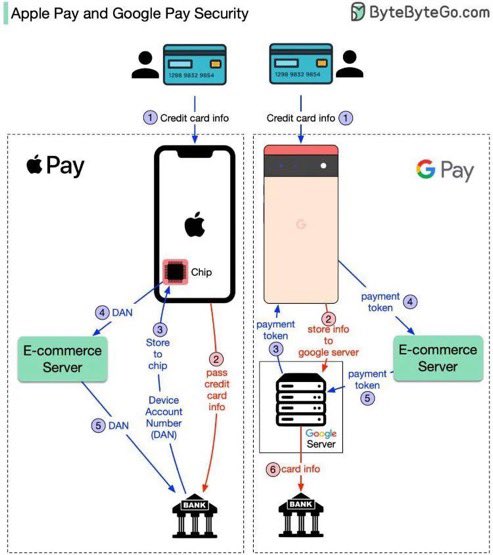
The image captures Apple’s use of a protected chip and the idea that merchants can work with payment credentials instead of a physical card number. Its weakness is treating the Google side as one universal architecture. It also hides payment processors and card networks behind a direct line to a bank.
And the names matter: the supplied picture compares Apple Pay and Google Pay. Samsung Pay is a separate service. Android is the operating system, not a single payment design.
A note for readers in India
Paying through Google Pay can also mean a UPI bank-account payment. Google documents a separate UPI integration for India. This story concerns card-based wallets and checkout; its token diagrams do not describe an ordinary UPI transfer. [5]
The useful question behind the beep
A chip on one side and a server on the other makes a striking picture. It does not establish a universal security winner.
The more useful questions are specific: which credential reaches the merchant or processor, how is the purchase authorized, and which payment flow are we discussing?
Your coffee still arrives after one quick tap. Understanding the journey takes a little longer.